Posts

Showing posts with the label Workflows

Getting Started with Bizagi BPM

If you go through demo Video of Bizagi you can easily get started with Bizagi in 50-10 minutes. As I was evaluating it in a way where I have to run processes on exisiting data already in another database. I was searching for functionality keeping in mind that this is a normal case for each and every one except most of information that will be available on forms will be coming for external databases and Bizagi was not an exception. There is a WIKI on their website that explains how to integrate Bizagi with external datasources which is very good and will help to understand this concept of Replication and Virtualization very well. have a look at this link and you will definately find it interesting :) All you need to do is to make sure that your data types are supported by Bizagi. BTW it support most of the commonly used data types you may see details here In case your table contain columns that are not supported by Bizagi you may use set of supported columns using Schema bind...
Bizagi Worflows

I was during a research and impress by a workflow engine implemented at manay places. Bizagi workflow also placed in Visionaries quarant by Gartner in 2010 Gartner report. Good thing about this BPM that an evaluation version is freely available. Do try I hope you will like it ;) http://www.bizagi.com

Write custom workflow for content approval

In order to write custom workflow for content approval you may need to do a lot depending on your requirements but following are few useful tips that may help you to to it quickly 1. How to approve list item from your code In order to approve list item from your code you need to need to modify list item's moderation status using following line Item.ModerationInformation.Status = SPModerationStatusType.Approved Where Item is your list item 2. In order to start workflow automatically on item publishing event You need to select following option while associating custom workflow with your list "Start this workflow to approve publishing a major version of an item" You may not find this option with your custom work flow if you haven't placed following configuration in your wokflow meta data while defining work flow. < Workflow .... . > .......... < MetaData > < InitiationType > Manual;#OnNewItem;#OnItemUpdate;#OnMajorCheckIn </ InitiationType > ...

General correlation token related issues with CreateTaskWithContentType

You may encounter different issues while working with windows workflow foundation if you have not initialize you correlation token correctly or not configured you activity properly. When you enable tracing or start debugging your workflow you may get following. CorrelationToken Uninitialized for {corelationtokenname} owner activity {Task Name} following configuration needs to be checked in order to rectify above issue. 1. Check "Correlation Token.Owner Activity" is set to current state CreateTaskWithContentType should not run with shared workflow correlation token. You should define separate correlation token for all task activities. The owner of defined correlation token should be your activity. 2. Check all related activities e.g. OnTaskChange etc has same correlation token When you utilize CreateTaskWithContentType activity you may need to place few more activities e.g. OnTaskChange, CompleteTask etc. Activities related to CreateTaskWithContentType activity should have sa...

Sharepoint Workflows / ASP.NET - Logging using diagnostic traceing

One of the coolest feature in asp.net is its tracing. Good thing is that it can be utilized in sharepoint as well and provide an easy way for logging inside workflow foundation. You just need to add following in you sharepoint web.config file <system.diagnostics> <switches> <add name="System.Workflow LogToTraceListeners" value="1" /> <add name="System.Workflow.Runtime.Hosting" value="Verbose" /> <add name="System.Workflow.Runtime" value="Verbose" /> <add name="System.Workflow.Runtime.Tracking" value="Verbose" /> <add name="System.Workflow.Activities" value="Verbose" /> <add name="System.Workflow.Activities.Rules" value="Verbose" /> <add name="[Your namespace]" value="Verbose" /> </switches> <trace autoflush="true" indentsize="4"> <listeners> <add name=...

Starting child sharepoint workflow from a custom parent workflow

In case you need to encounter a case when you want to run child work flow from you parent share point work flow the obvious option would be the invoke Work flow activity. It is out of box and run asynchronously naturally same goes in my mind. I tried it in my parent work flow and result was very strange. Invoke work flow activity works fine but none of the child flow get started. I tried debugging and found several errors generated by work flow runtime few of them are mentioned below System.Workflow.Runtime Information: 0 : CorrelationToken Uninitialized for owner activity System.Workflow.Runtime Information: 0 : CorrelationToken Uninitialized for owner activity System.Workflow.Runtime Critical: 0 : Uncaught exception escaped to the root of the workflow. In instance in activity Inner exception: System.Workflow.Runtime.Hosting.PersistenceException: Object reference not set to an instance of an object. ---> System.NullReferenceException: Object reference not set to an instance ...

Sharepoint workflow doesnt started automatically

I recently experienced this issues with my custom work flow designed using share point designer. Work flow didn't started automatically even though option was selected. After doing a little research I found that issue was due to a security fix in WSS 3.o SP1 Therefore, after installing WSS 3.0 SP1, declarative workflows will not start automatically start if 1. The Windows SharePoint Services Web application runs under a user's domain account. 2. The user logs in by using this domain account. 3. The site displays the user name as System Account.

Sharepoint designer workflow : Getting data from user and storing it in workflow vari

Image
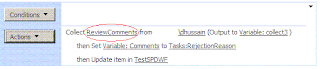
Sharepoint designer workflows provide a great functionality using its out of the box activity for collecting data from user with in workflow. When this action is used a form for getting data is created automatically as shown in images below So if a user want to do some small customization the form will be available to him to do so. The data collected in response to this action becomes part of task and can be used later in your flow for any decsion or can be utilized in other actions. For e.g. I used data (comments) from user and update column of my list called comments. This Action ask you three things 1: Data (Used for desinging question and creating form) 2: User (Used for assigning for to MOSS user) 3: Output Variable (List Item Id for fetching data later) In my sample I clicked on data and add a field for asking comments from user. Assigned this to appropriate user and set output variable to a newly created variable collect3 I created a new workflow variable of type comments for s...

Sharepoint Designer Workflow Calling a webservice function

Share point 2007 provide great functionality of work flows using share point designer. Sharepoint designer workflow provides different set of workflow activities to support users in designing their custom workflow. However designing is not limited to out of the box activities but it also provides power to create custom designer activities so that user can design their own logic according to their business. In my case I was just thinking that if we can call a webservice from a sharepoint designer it would make a life easy for doing lots of things can can only be achieved by complex calculation from external systems. There are two ways for this 1. Write your own custom activity 2. Use an extension from codeplex I found following extension package very help full http://www.codeplex.com/iLoveSharePoint/Release/ProjectReleases.aspx?ReleaseId=20898 and not only this but the deployment is fairly simple and help provided on following blog is also great. http://cglessner.blogspot.com/2008/12/il...